Tune Up, The Manly Salon
- 3.2
- Rating
- 10.00K
- Installs
- Free
- Price

 Analysis by App-foxy
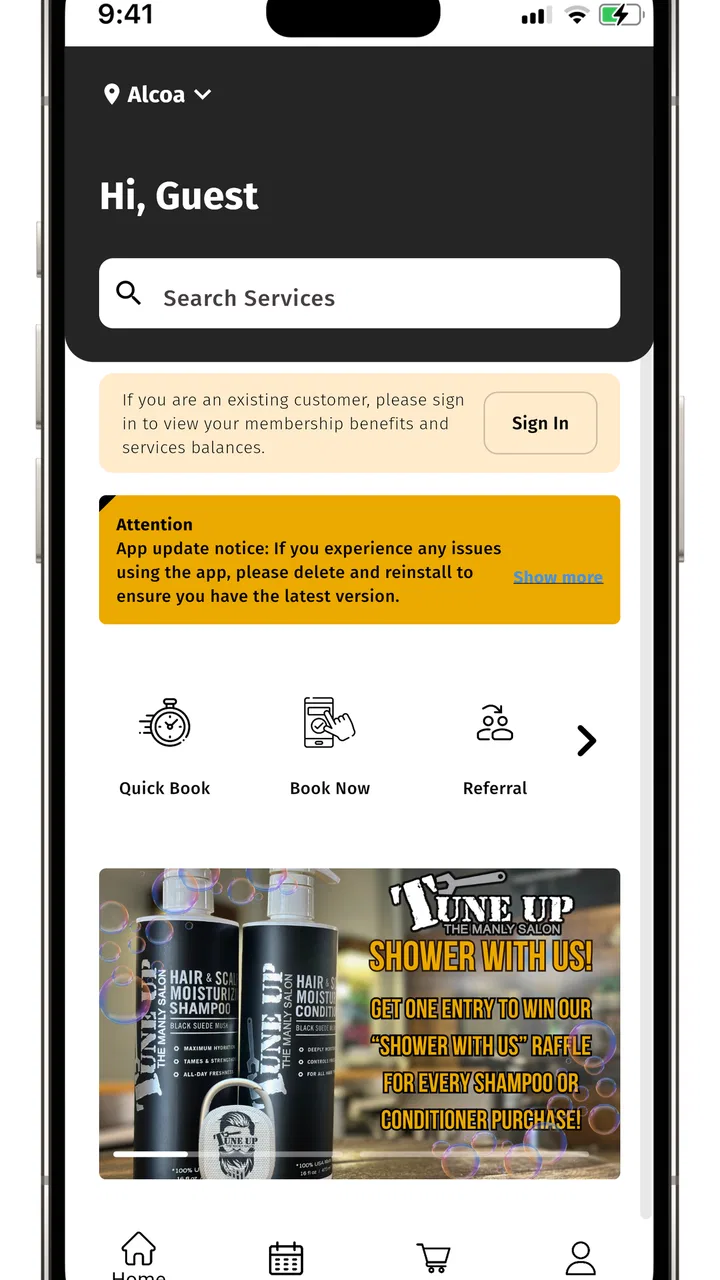
Booking a grooming visit is the kind of task I usually want to finish in a few seconds, not turn into a chain of phone calls and reminders. Tune Up, The Manly Salon is a free beauty app from Tune Up “The Manly” Salon, built around giving customers a more convenient way to interact with the salon while away from the shop. I approached it as a practical customer tool rather than a full beauty platform, and that distinction matters: its value depends less on endless features and more on whether it helps you move smoothly from deciding you need a service to actually getting it arranged.
The app has been available since October 1, 2018, and its current version is 5.19.0. It is rated for Everyone and requires OS 12 or later, so the first question is simple: does your phone meet that requirement? The app has passed the early discovery stage with over ten thousand installs, while its average rating sits at 3.2 from around sixty ratings and roughly thirty reviews. That is a mixed reception, not an automatic reason to avoid it, but it does suggest that the experience may feel more useful to existing Tune Up customers than to someone looking for a general-purpose beauty marketplace.
Getting past the first points of friction
My first practical recommendation is to treat the app as a direct salon companion, not as a replacement for every other planning tool on your phone. If you are already considering Tune Up “The Manly” Salon, the app makes sense because it keeps your attention on that particular business. If you are still comparing several salons, a broader search service or a regular web search may be more helpful at the beginning, since this app is not presented as a directory for the whole beauty industry.
You May Also Like

 AccuWeather: Weather Radar
AccuWeather Review: A Quick, Clear Forecast for Everyday Decisions
For everyday plans, the best forecast is the one you can understand quickly. AccuWeather makes rain timing, radar, and local conditions easy to act on, with a few trade-offs.

 Hill Climb Racing
Why Hill Climb Racing Still Turns Crashes Into One More Run
A tiny car, a bumpy hill and one more upgrade: Hill Climb Racing keeps resurfacing because its simple chaos makes every near-miss feel personal.

 AliExpress - Shopping App
AliExpress Makes Global Shopping Feel Personal, but Shoppers Bear the Risk
AliExpress turns a global marketplace into a pocket-sized discovery engine. Its reach is useful, its shopping loop compelling, and its trade-offs easy to miss.

 Lords Mobile: Kingdom Wars
Lords Mobile Is a Kingdom-Building Routine, Not a Quick Match
A case-by-case verdict on the building, battles, device demands, and social commitments that make Lords Mobile rewarding for some players and exhausting for others.

 PDF Scanner app - TapScanner
TapScanner Makes Paperwork Easier to Capture, Check, and Share
TapScanner makes scanning with a phone feel less like a rescue operation and more like a dependable step in getting work done. Its capture tools are useful, though not flawless.

 Block Blast!
 Shows How Much a Puzzle Game Can Leave Out
A quiet grid game shows why puzzle players increasingly value instant clarity, repeatable skill and low-pressure play—and where the genre still needs to catch up.
More From Our News Desk
View All News


Where users can get stuck is often before they even reach the useful part. An app connected to one salon naturally depends on the customer understanding what they want, when they want it, and whether the salon is the right fit. I would decide those basics first. For example, if I need a quick tidy-up before work, I would have a preferred day and a backup day ready. That makes it easier to recognize whether the app is helping me arrange a visit or merely making me repeat information I could have handled by phone.
Another common source of frustration is expecting the app to behave like a general booking marketplace. That expectation can make a focused salon app seem limited even when it is doing its intended job. I would not install it expecting a long list of unrelated salons, a beauty tutorial library, or a complete personal grooming tracker. Its purpose is narrower: convenience for people dealing with this salon.
The short store description is simply “Tune Up,” while the longer summary emphasizes convenience wherever you are. I read that as a useful clue about the intended experience, but not as a promise that every part of the customer journey happens automatically. A convenient app still requires the user to check details, choose carefully, and recover sensibly if something does not load as expected.
Checks worth making before you blame the app
The operating-system requirement deserves attention because it can explain an installation problem immediately. On an older phone, the app may not be available to install or may not update normally. Rather than repeatedly retrying, I would check the device software first and make sure there is enough free storage for an update. These are ordinary checks, but they prevent a lot of wasted time and do not require changing anything inside the app.
I would also look at the connection I am using. A weak mobile signal, an overloaded public Wi-Fi network, or a connection that switches between the two can make a salon app appear frozen when the real issue is communication with the service behind it. My preferred test is simple: move to a stable connection, close the app, reopen it once, and try the same action again. Repeated tapping usually makes the situation less clear rather than fixing it.
If the app opens but a screen does not respond, I would avoid immediately deleting it. First, I would leave that screen, return to the previous one, and try again after confirming that the phone is online. If the problem continues, restarting the app is a reasonable next step. Reinstallation can be useful later, but it may remove local session information, so I would only use it after I am comfortable signing in or setting up again if the app asks me to.
The most useful setup habit is to prepare a fallback before you need the appointment. Keep the salon’s ordinary contact route available in your phone, and note the time you were trying to arrange. That does not undermine the app; it gives you a safe way to finish the task if the digital route becomes inconvenient. For a haircut before an event, this matters more than spending several minutes troubleshooting while the available time disappears.
A workflow that keeps the appointment task manageable
I found it helpful to separate the process into three stages: decide what I need, use the app to arrange or check the salon interaction, and verify the result before closing everything. That last stage is easy to skip. If I have selected a time or sent a request, I want to see a clear indication that the action completed rather than assuming it worked because the screen changed.
This is especially important when a connection is unstable. A delayed response can tempt you to press the same control again, which may create uncertainty about whether you made one request or more than one. My approach is to wait briefly, look for a visible confirmation, and then check the relevant screen again. If there is still no clear result, I would use the salon’s normal contact method instead of repeating the action several times.
A realistic use case is a weekday morning when I realize I need grooming before a weekend gathering. I would open the app during a quiet moment, choose the salon-related action I need, and keep a second possible time in mind. If the first attempt does not give me a clear outcome, I would stop experimenting and contact the salon directly with the details I already prepared. This is faster and less stressful than treating the app as the only possible route.
There is also a useful distinction between planning and confirmation. I can use the app to begin arranging a visit, but I should not rely on memory for the final details. I would save the confirmed time in my calendar or notes, along with any service information shown to me. That small step protects me from the very ordinary mistake of opening an app, seeing a successful-looking screen, and later forgetting what was actually arranged.
For repeat customers, the app’s greatest advantage is likely reducing the effort of starting the same salon interaction again. I would still review the details each time rather than assuming a previous choice is automatically appropriate. My needs can change, and a familiar workflow can encourage careless confirmation. Convenience is valuable only when it does not remove the final check.
When the problem is probably outside the app
Not every disappointing result points to a software failure. A salon’s availability, response time, opening schedule, or handling of a request belongs to the real-world service process. If an action completes but the result does not match what I expected, I would first distinguish between a technical error and a scheduling issue. The app may have delivered the request correctly even if the preferred time is no longer available.
The same applies when information seems different from what I heard elsewhere. I would compare the app with the salon’s direct communication and ask the salon to clarify rather than assuming one screen is automatically wrong. A focused salon app can make contact more convenient, but it cannot remove the need for the business to manage appointments and communicate changes.
Phone behavior can also create misleading symptoms. Aggressive battery-saving settings, a nearly full device, outdated system software, or a connection that blocks certain services can affect how any app behaves. I would test the app after closing other demanding apps and using a reliable connection. If other applications are also failing to load, the salon app is unlikely to be the main cause.
Privacy and comfort are part of the decision as well. This is an Everyone-rated beauty app, which makes it broadly accessible, but that rating does not tell me whether it is the right tool for every adult customer. I would still read each screen carefully before submitting personal details and use only the information needed for the salon interaction. If I am uncomfortable with digital booking or prefer discussing a specific request with a person, calling the salon remains a perfectly sensible alternative.
Who will get the most from it
I see the strongest fit for existing or prospective customers of Tune Up “The Manly” Salon who want a direct mobile route to salon-related tasks. It is also a reasonable choice for someone who often handles appointments while travelling between work, home, and errands, because the app’s central promise is convenience away from the salon itself.
It may be less suitable for a person who wants to compare many businesses, discover unfamiliar stylists, read a large body of community feedback, or manage appointments across several salons in one place. In those cases, a broad booking service, a map application, or direct phone contact may provide a better overview. Choosing the alternative is not a criticism of this app; it simply reflects a different need.
I would also hesitate to recommend making it the sole method for an important, time-sensitive appointment until I had used it successfully once. The average rating of 3.2 indicates that the experience has not been uniformly smooth for everyone. That does not prove a particular problem on your phone, but it is a reason to keep the fallback workflow I described instead of assuming the app cannot fail.
What the version and platform details mean in daily use
The current version, 5.19.0, tells me that the app is still presented as an actively versioned product rather than an abandoned download. I would keep automatic updates enabled where practical, because salon-related tools can depend on changes that are not obvious from the outside. At the same time, an update is not a guarantee that every issue disappears. If something stops working immediately after an update, I would restart the app, test the connection, and then decide whether the issue is temporary or worth reporting through the available support route.
Because the minimum OS is 12, users with newer phones should have a straightforward starting point, while people keeping an older device need to verify compatibility before planning around the app. I would not replace a working phone solely for this tool. If the device cannot run it, the practical answer is to use the salon’s ordinary contact option or another planning method rather than forcing the app into the workflow.
The free price lowers the risk of trying it. I can test whether it genuinely saves me time without committing money, which is important for a salon-specific app with a moderate rating. Still, free does not mean frictionless. My standard would be simple: after a short trial, does it make arranging Tune Up visits easier than my previous method? If yes, it earns a place on my phone. If not, I would remove it and return to the method that gives me clearer confirmation.
My practical verdict after weighing convenience against control
Tune Up, The Manly Salon is best understood as a focused convenience tool for one salon, not as a complete beauty-management system. I like the idea of having a direct mobile option when I already know where I want to go, and the free download makes testing that workflow easy. The app’s real strength is not breadth; it is the possibility of reducing small bits of friction for customers who regularly use this particular salon.
My reservation is that the experience needs a sensible backup plan. The mixed 3.2 average rating means I would not promise a perfectly smooth journey to every user, and the app should not be judged as though it were a universal booking marketplace. Connection checks, operating-system compatibility, confirmation habits, and direct contact with the salon all remain part of using it responsibly.
I would recommend trying it if Tune Up “The Manly” Salon is already your preferred destination and you want to handle salon-related arrangements from your phone. I would skip it if your main goal is comparing many beauty businesses or keeping every appointment in one cross-salon dashboard. For the right customer, it can be a convenient shortcut; for everyone else, the usual phone, calendar, or broader booking alternatives may be clearer and more dependable.
In the end, my advice is to test it on an ordinary appointment rather than an urgent one. Confirm that your device meets the requirement, use a stable connection, verify the result, and keep the salon’s direct contact route available. If that short trial saves effort, the app has done its job. If it adds uncertainty, there is no reason to force it into your routine simply because it is free.
FAQs for Tune Up, The Manly Salon
01What features does Tune Up, The Manly Salon offer?
Tune Up, The Manly Salon app provides users with a range of features designed to enhance their grooming experience. Key offerings include appointment scheduling, loyalty rewards, and style consultations. The app also allows users to browse services, view stylist profiles, and explore various grooming tips tailored for men.
02Is Tune Up, The Manly Salon available for both Android and iOS devices?
Yes, Tune Up, The Manly Salon is available for download on both Android and iOS platforms. Users can find the app on Google Play Store and Apple App Store, ensuring a seamless experience regardless of their preferred device. Make sure to have the latest OS version for optimal performance.
03How does the appointment scheduling feature work in the app?
The appointment scheduling feature in Tune Up, The Manly Salon app allows users to book services at their convenience. Simply select a service, choose a preferred stylist, and pick an available time slot. The app sends reminders and notifications to keep users updated about their appointments, minimizing missed dates.
04Are there any membership or loyalty programs available through the app?
Yes, Tune Up, The Manly Salon app offers a loyalty program where users can earn points for every service booked through the app. These points can be redeemed for discounts on future services. The app also provides exclusive offers and promotions for registered users, enhancing the overall value.
05What privacy measures are in place to protect user data?
Tune Up, The Manly Salon app is committed to safeguarding user privacy. The app employs robust encryption methods to ensure that personal information and payment details are secure. Additionally, the app adheres to standard privacy regulations, providing users with control over their data and how it’s used.
Pros
- User-friendly interface for easy navigation.
- Wide range of grooming services available.
- Convenient appointment scheduling feature.
- Offers personalized style recommendations.
- Loyalty rewards for frequent users.
Cons
- Limited availability in select locations.
- Occasional app glitches reported by users.
- Requires stable internet for full functionality.
- In-app ads can be distracting.
- Some services are relatively expensive.

Tune Up, The Manly Salon
Gallery